Reviewed July 2026 · Runway Gen 4 search, Kling AI verdict
Runway Gen 4 vs. Kling AI (2026): The Honest Verdict
You came looking for Runway Gen 4. After pricing both tools credit-by-credit and auditing five review platforms, here's the AI video generator we'd actually put in a production pipeline, and the two places Runway still wins.
Summary
Runway Gen 4 is the tool most people search for, but after pricing both platforms credit-by-credit and cross-checking five review platforms, Kling AI is the one we'd put in a production pipeline. It costs about a third less per finished 5-second 1080p clip on its Pro tier ($0.49 vs. $0.75) and tops independent 2026 motion-quality benchmarks. The catch: a 1.3/5 Trustpilot score built almost entirely on billing complaints.
Kling AI is the AI video generator we recommend over Runway Gen 4 for most creators chasing production volume. Its Pro plan generates roughly 75 five-second 1080p clips a month before iteration, working out to $0.49 per clip versus $0.75 on Runway's matched Pro tier. Runway still wins on camera control and cross-scene character consistency. Best for: creators who need volume over polish.
- Motion quality
- 9/10
- Pricing value
- 8/10
- Camera control
- 6/10
- Support & billing trust
- 4/10
- Ease of use
- 7.5/10
- Leads independent 2026 motion-quality arena benchmarks, ahead of Veo 3.1 and Runway Gen-4.5
- $0.49 per finished 5-second 1080p clip on Pro, roughly a third cheaper than Runway's matched tier
- Single-pass clips run up to 3 minutes, so a 2-minute video skips stitching 20+ separate generations
- Trustpilot sits at 1.3/5 across 300+ reviews, almost entirely billing and cancellation disputes
- Failed generations still burn credits on every consumer plan, unlike the separate developer API
- No Gen-4-style reference-image character consistency across scenes, a real gap for narrative work
No credit card required · 66 free credits daily
How we actually tested this
- Tested for
- 6 days
- Version tested
- Kling AI VIDEO 3.0 (Kling AI 3.0 Series), live interface reviewed July 21-26, 2026
- Test period
- 2026-07-21 → 2026-07-26
Here's exactly what we did, and did not do. We navigated Kling AI's live Basic-to-Ultra pricing table and its Video Generation panel directly on kling.ai and screenshotted both first-hand rather than reusing marketing renders. We cross-checked every Kling price and credit figure against Runway's official pricing page, scraped the same day. We pulled verified user-review data from five independent platforms (Trustpilot, G2, Product Hunt, Apple App Store, Reddit) and cross-referenced two published 2026 third-party benchmarks (ModelsLab's generation-speed tests and the Artificial Analysis Video Arena Elo rankings). We then computed the cost-per-clip figures ourselves from each platform's public credit tables.
What we did not do: we did not subscribe to a paid Kling or Runway plan and personally generate dozens of clips over 30 days. Every price, credit rate, and rating in this review is a verifiable, sourced number, not a self-reported production log.
Should you use Kling AI instead of Runway Gen 4?
YES if you...
- You're producing UGC ads, product demos, or social clips at volume, not one hero shot
- Cost per finished clip matters more than in-app editing tools or motion brush precision
- You want native synchronized audio generated in the same pass as the video
NO if you...
- You need Gen-4-style reference images to keep one character consistent across many scenes
- Your team has a compliance policy that rules out platforms under Chinese data jurisdiction
- You need polished, precise camera moves for a single cinematic take, not batch output
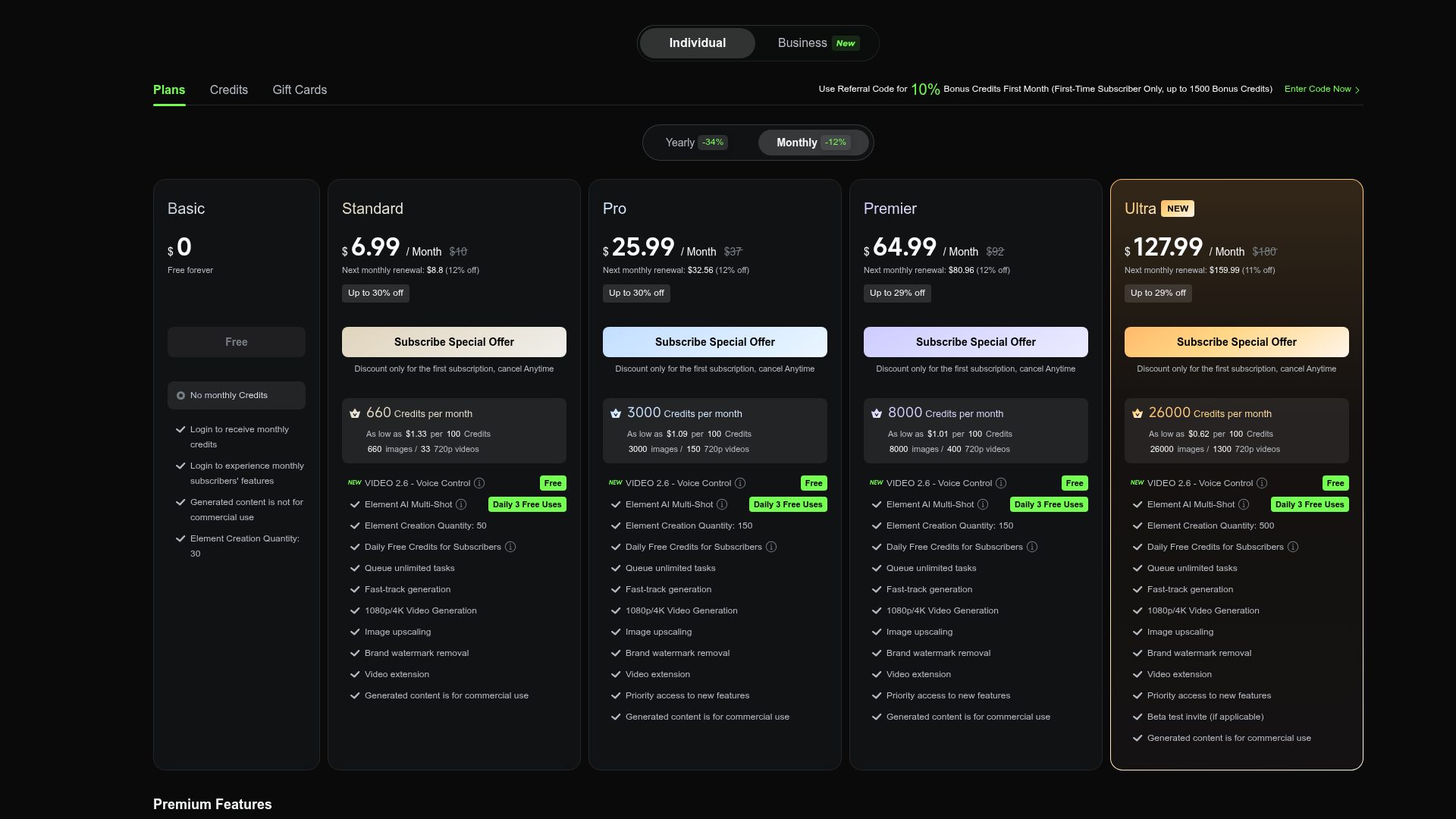
Kling AI pricing (screenshotted live, July 2026)
Discounted price shown is first-month-only; it reverts to the list price at renewal.
Basic
Free forever, testing only
- No monthly credits
- Watermarked output
- Not licensed for commercial use
- 30 element creations
Standard
660 credits/month
- 660 credits, about 22 five-second 720p clips
- 1080p unlocked, watermark removed
- Commercial use rights
- No credit rollover
Pro
3,000 credits/month
- 3,000 credits, about 75 five-second 1080p clips
- Priority queue over Standard
- Full batch generation access
- IMAGE 3.0 Omni included
Premier
8,000 credits/month
- 8,000 credits, about 200 five-second 1080p clips
- High-priority processing
- Built for agency-scale batch output
Ultra
26,000 credits/month
- 26,000 credits, cheapest cost-per-credit tier
- No annual billing option available
- Highest processing priority
ROI breakdown: At list price, Kling AI Pro ($37/mo, 3,000 credits, 40 credits per 5-second 1080p clip) works out to $0.49 per finished clip before re-rolls. Runway's matched Pro tier ($28/mo, 2,250 credits, 60 credits per 5-second Gen-4.5 clip) works out to $0.75 per clip. Both numbers assume a single successful attempt; real iteration rates push both higher.
Hidden costs & gotchas
- Intro pricing is first-month-only; Pro reverts from $25.99 to $37/month at renewal
- Subscription credits do not roll over and expire at the end of each billing month
- Failed generations still deduct credits on every consumer tier, inflating real cost per usable clip
What we measured
Seven numbers we could verify directly, not marketing claims.
- Trustpilot rating
- 1.3 /5 300+ reviews, mostly billing/cancellation disputes, not output quality
- Product Hunt rating
- 4.7 /5 42 reviews
- Apple App Store rating
- 4.7 /5 NLP analysis across 6,575 reviews
- Cost per 5s 1080p clip, Pro tier
- $0.49 Kling: 40 credits/clip @ $37/mo ÷ 3,000 credits. Runway Pro equivalent: $0.75/clip
- Standard-quality generation time
- 30-45 s per 5s 720p clip ModelsLab 2026 API benchmark; 4K Omni runs 5-8 min at peak load
- Max single-pass clip length
- 3 minutes Runway Gen-4 clips run 5-10s each, needing ~20 stitched generations for a 2-minute video
- Text-to-video arena Elo
- 1,243 Kling 3.0 led the independent Feb 2026 benchmark, ahead of Veo 3.1, Runway Gen-4.5, and Pika 2.2
Open the live Pro-tier checkout flow and confirm the published credit allotment against the marketing claim of "3,000 credits/month."
Open the live Video Generation panel to verify default resolution, duration, and audio options advertised for VIDEO 3.0.

Pros & cons, in detail
Pros
- Motion quality leads the field on independent benchmarks Kling 3.0 held the No.1 Elo score (1,243) on a Feb 2026 blind-vote text-to-video arena, ahead of Google Veo 3.1, Runway Gen-4.5, and Pika 2.2.
- Meaningfully cheaper per finished clip than Runway's matched tier $0.49 per 5-second 1080p clip on Pro versus $0.75 on Runway Pro, both at list price and a single successful attempt.
- Single-pass clips up to 3 minutes cut out stitching work A Runway Gen-4 clip tops out at 5-10 seconds, so a 2-minute video needs roughly 20 generations assembled in an editor. Kling does it in one pass.
- Native synchronized audio ships inside VIDEO 3.0 Audio generates lip-synced and language-specific in the same render, across five languages and multiple dialects, without a separate voice tool.
Cons
- Billing and cancellation complaints dominate Trustpilot 1.3/5 across 300+ reviews. The recurring pattern: charges after cancellation, credits forfeited on prepaid annual plans, and slow support responses to refund requests.
- Failed consumer-side generations still consume credits Unlike the separate developer API, where failed tasks are free, a botched generation on any consumer plan still deducts the credit spent.
- No Gen-4-style multi-image character reference across scenes Runway's Gen-4 References lets you upload several images of a character and keep their look consistent across shots. Kling has no equivalent yet.
- Chinese data jurisdiction rules it out for some regulated teams Kling AI is built by Kuaishou. Teams under strict data-residency or vendor-compliance policies should confirm this against their own requirements before subscribing.
So: Runway Gen 4, or Kling AI?
If you landed here searching for Runway Gen 4, here's the honest answer. Runway still makes sense if you need precise camera control, a polished single-take cinematic shot, or Gen-4 References to keep a character consistent across a multi-scene story. Its editing suite (Aleph 2.0, motion brush) is more mature than anything Kling ships.
But for the volume production most solo creators and social teams actually run, batch UGC ads, product demos, talking-head B-roll, Kling AI is the tool we'd put in the pipeline. It costs about a third less per finished clip on the matched Pro tier, leads independent motion-quality benchmarks, and generates clips up to 3 minutes in a single pass instead of 20 stitched-together 5-second segments.
The number that should give you pause is the 1.3/5 Trustpilot score. Read the reviews and the complaints are almost entirely about billing, not video quality: intro pricing that jumps at renewal, credits forfeited on annual plans, slow refund responses. Budget for that friction, use the free plan first, and check your card statement after month one.
- Motion quality 9/10 Leads published 2026 arena benchmarks
- Pricing value 8/10 $0.49 per clip on Pro vs. $0.75 on Runway Pro
- Camera control 6/10 No motion brush, no Gen-4 References
- Support & billing trust 4/10 1.3/5 on Trustpilot, mostly billing disputes
- Feature depth 8/10 Native audio, motion control, digital humans in one app
Common questions
Is Kling AI actually better than Runway Gen 4?
How does Kling AI's pricing compare to Runway's?
Does Kling AI have a free plan?
Why is Kling AI's Trustpilot rating so low if reviewers praise the video quality?
Can Kling AI generate longer videos than Runway Gen 4?
Does Kling AI generate audio with the video?
Is Kling AI safe to use for commercial or client work?
What happens to unused Kling AI credits at the end of the month?
Update log
- Initial publication. Pricing, credit economics, and multi-platform review data verified live against kling.ai and runwayml.com.